
Core Balance Mechanics
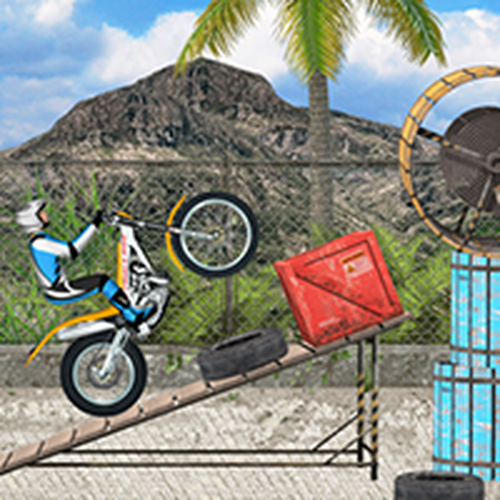
Moto Balance Dash focuses on the physics of keeping a motorbike upright while moving forward. Players must lean forward or backward to shift the bike's center of gravity. Accelerating too quickly can cause the front wheel to lift, while braking hard may tip the bike forward. The challenge lies in finding the right balance between speed and stability. Each track presents a new set of obstacles that test your ability to adjust posture and throttle in real time. This mechanic creates a satisfying loop where small mistakes lead to crashes, and precise control leads to smooth runs.
Track Design and Obstacles
The game includes a variety of tracks that increase in complexity. Early courses feature gentle slopes and simple barriers, allowing players to learn the basics of leaning and braking. Later tracks introduce steep ramps, tight turns, and moving obstacles that require careful timing. The environment is designed with vibrant colors and clear visual cues, making it easy to spot upcoming challenges. Each track has a finish line, and completing a course records your time. This encourages repeated attempts to improve your performance and master the layout.
Controls Across Platforms
Moto Balance Dash is built for both desktop and mobile play. On a computer, keyboard keys control acceleration, braking, and leaning actions. Mobile devices use on-screen buttons for the same functions. The controls are simple to learn but require practice to use effectively. The responsive input system ensures that every press or tap translates directly into bike movement. This consistency helps players develop muscle memory over time. Whether playing on a large monitor or a small screen, the core experience remains the same.
Progression and Skill Development
Progress in Moto Balance Dash comes from improving your ability to handle the bike under pressure. Beginners are encouraged to start with easier tracks to build confidence with balance and obstacle navigation. As you advance, the game demands faster reaction times and more precise throttle control. There is no complex upgrade system or character progression. Instead, the reward is seeing your own times drop as you learn to take better lines and avoid crashes. This makes the game accessible to casual players while offering depth for those seeking a challenge.
Visual Style and Feedback
The game uses bright, colorful graphics that keep the focus on the action. The bike and rider are clearly visible against the track, and obstacles stand out against the background. When the bike crashes, the physics simulation shows a realistic tumble, providing clear feedback on what went wrong. The interface is minimal, showing only the timer and basic controls. This clean design helps players concentrate on the task without distraction. The visual style supports the family-friendly nature of the game, making it suitable for players of all ages.
Comments
0 comments